
Write where you work
Use Viora in the Mac apps where your writing already happens instead of moving every thought into a separate editor.
Viora is a Mac voice AI assistant for turning spoken thoughts into writing, edits, answers, and small actions inside your daily workspace. Use this page when you are new to Viora or already using Viora and want a better path.
Start with the product behavior you want to understand, then move into examples, release notes, or comparisons only when they help.
Learn how Viora turns natural speech into usable text inside the app you are already using.
Use Voice Agent when you want help shaping a reply, rewriting a rough note, answering a question, or starting an action.
See how Viora fits email, docs, tickets, planning, research, and daily writing on Mac.
Understand built-in Mac dictation first, then see where a dedicated assistant like Viora becomes useful.
See why Viora is more than speech-to-text: it can help with writing, editing, asking, and small workflows.
Follow new fixes and improvements across the Viora web and Mac experience.
Use these pages when you want the exact product behavior behind a workflow, from first draft to rewrite, question, agent task, and remembered guidance.
Speak naturally and place cleaned-up text into the Mac app where your cursor already is.
Select existing text, say how it should change, and review a rewrite without moving work into a separate chat.
Ask questions about selected or nearby context while staying in the app where you are reading or writing.
Use voice for writing, edits, contextual answers, and supported small agent tasks on macOS.
Teach Viora controlled terms, preferences, boundaries, and workflow guidance for repeated Mac voice work.
After you understand the feature, move to examples if you need workflow fit, or pricing if you are checking plan boundaries.
If you are new to Viora, use these resources to learn what the Mac app does and where it fits in everyday work.
Start with dictation to see how Viora helps you speak naturally and produce text you can use right away.
Learn how Voice Agent can help you write, edit, ask, and do more than basic transcription.
Pick a task you already do on Mac, such as an email reply or document update, and use Viora there first.
If you are already using Viora, this page points you toward the workflows that make the Mac app more useful day to day.
Use Viora in the Mac apps where your writing already happens instead of moving every thought into a separate editor.
Tell Viora what you want changed, shortened, expanded, translated, or clarified, then keep working from the result.
Use release notes to see what has changed before assuming an old workflow still works the same way.
The page is for people who want to understand and use Viora in normal Mac work, not just compare AI tools from a distance.
Mac users who live in Mail, Slack, docs, browsers, and code editors and want voice to reduce repeated typing.
People turning rough spoken thoughts into polished replies, documentation, updates, tickets, and planning notes.
Users who want to ask, revise, summarize, or start small tasks without turning every step into manual typing.
When you need to choose between Viora and another voice tool, these guides explain the practical differences without making comparison the whole point of the page.
Compare Viora and VoiceOS for Mac voice work: memory, platform, dictation, agent actions, and current public pricing. Checked September 3, 2026.
Looking for a Superwhisper alternative on Mac? See how Viora compares on dictation, pricing, privacy, and voice AI workflows, plus how to switch.
Looking for a Wispr Flow alternative on Mac? See how Viora compares on dictation, pricing, privacy, languages, and how to switch from Wispr Flow.
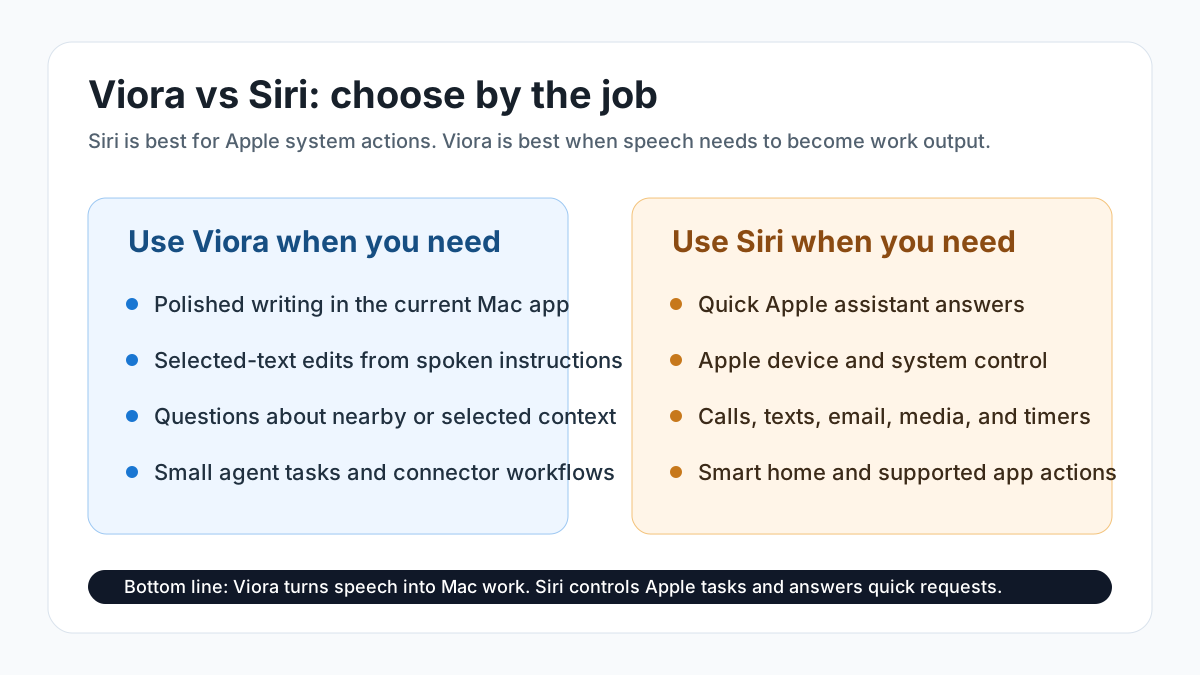
Compare Viora and Siri for Mac voice AI, Apple Dictation, Writing Tools, privacy, platform availability, text editing, and best-fit workflows.
Use these notes to choose a starting point without reading every page first.
Let voice become the most natural connection between you and your Mac.